

How To Create Clustered Index In Sql Server With Example
Summary: in this tutorial, you will learn about the SQL Server clustered index and how to define a clustered index for a table.
Introduction to SQL Server clustered indexes
The following statement creates a new table named production.parts that consists of two columns part_id and part_name:
Code language: CSS ( css )
CREATE TABLE production .parts( part_id INT NOT NULL, part_name VARCHAR(100) );
And this statement inserts some rows into the production.parts table:
Code language: JavaScript ( javascript )
INSERT INTO production.parts(part_id, part_name) VALUES (1,'Frame'), (2,'Head Tube'), (3,'Handlebar Grip'), (4,'Shock Absorber'), (5,'Fork');
The production.parts table does not have a primary key, therefore, SQL Server stores its rows in an unordered structure called a heap.
When you query data from the production.parts table, the query optimizer needs to scan the whole table to locate the correct one.
For example, this statement finds the part whose part id is 5.
SELECT part_id, part_name FROM production.parts WHERE part_id = 5;
If you display the estimated execution plan in SQL Server Management Studio, you can see how SQL Server came up with the following query plan:
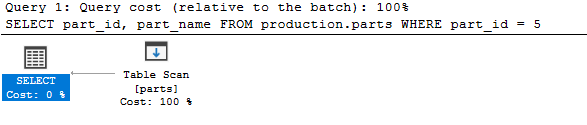
Note that to display the estimated execution plan in SQL Server Management Studio, you click the Display Estimated Execution Plan button or select the query and press the keyboard shortcut Ctrl+L:

Because the production.parts table has only five rows, the query will execute very fast. However, if the table contains a large number of rows, It will take a lot of time and resources to search for data.
To resolve this issue, SQL Server provides a dedicated structure to speed up retrieval of rows from a table called index.
SQL Server has two types of indexes: clustered index and non-clustered index. We will focus on the clustered index in this tutorial.
A clustered index stores data rows in a sorted structure based on its key values. Each table has only one clustered index because data rows can be only sorted in one order. The table that has a clustered index is called a clustered table.
The following picture illustrates the structure of a clustered index:
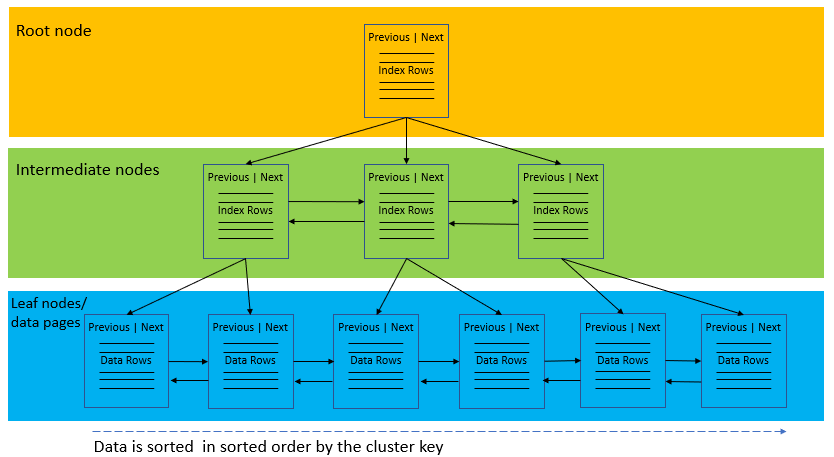
A clustered index organizes data using a special structured so-called B-tree (or balanced tree) which enables searches, inserts, updates, and deletes in logarithmic amortized time.
In this structure, the top node of the B-tree is called the root node. The nodes at the bottom level are called the leaf nodes. Any index levels between the root and the leaf nodes are known as intermediate levels.
In the B-Tree, the root node and intermediate level nodes contain index pages that hold index rows. The leaf nodes contain the data pages of the underlying table. The pages in each level of the index are linked using another structure called a doubly-linked list.
SQL Server Clustered Index and Primary key constraint
When you create a table with a primary key, SQL Server automatically creates a corresponding clustered index based on columns included in the primary key.
This statement creates a new table named production.part_prices with a primary key that includes two columns: part_id and valid_from.
Code language: JavaScript ( javascript )
CREATE TABLE production.part_prices( part_id int, valid_from date, price decimal(18,4) not null, PRIMARY KEY(part_id, valid_from) );
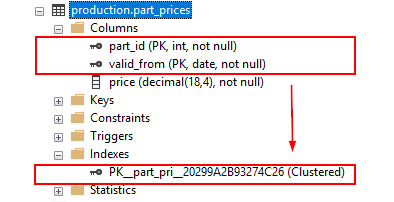
If you add a primary key constraint to an existing table that already has a clustered index, SQL Server will enforce the primary key using a non-clustered index:
This statement defines a primary key for the production.parts table:
Code language: CSS ( css )
ALTER TABLE production .parts ADD PRIMARY KEY(part_id);
SQL Server created a non-clustered index for the primary key.
Using SQL Server CREATE CLUSTERED INDEX statement to create a clustered index.
In case a table does not have a primary key, which is very rare, you can use the CREATE CLUSTERED INDEX statement to define a clustered index for the table.
The following statement creates a clustered index for the production.parts table:
Code language: CSS ( css )
CREATE CLUSTERED INDEX ix_parts_id ON production .parts (part_id);
If you open the Indexes node under the table name, you will see the new index name ix_parts_id with type Clustered.
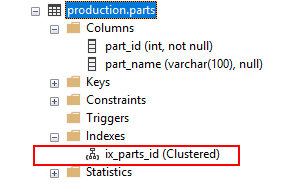
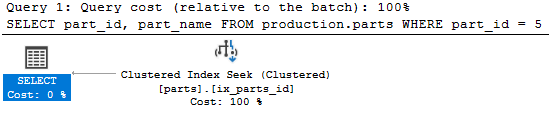
When executing the following statement, SQL Server traverses the index (Clustered index seek) to locate the row, which is faster than scanning the whole table.
SELECT part_id, part_name FROM production.parts WHERE part_id = 5;
SQL Server CREATE CLUSTERED INDEX syntax
The syntax for creating a clustered index is as follows:
Code language: CSS ( css )
CREATE CLUSTERED INDEX index_name ON schema_name .table_name (column_list);
In this syntax:
- First, specify the name of the clustered index after the
CREATE CLUSTERED INDEXclause. - Second, specify the schema and table name on which you want to create the index.
- Third, list one or more columns included in the index.
In this tutorial, you have learned about the SQL Server clustered indexes and how to use the CREATE CLUSTERED INDEX statement to define a new clustered index for a table.
How To Create Clustered Index In Sql Server With Example
Source: https://www.sqlservertutorial.net/sql-server-indexes/sql-server-clustered-indexes/
Posted by: lujancoldingaze.blogspot.com
0 Response to "How To Create Clustered Index In Sql Server With Example"
Post a Comment